I’m addicted to my rss feeds. I go over the feeds for tech news, current affairs, friends blogs, and many more. However, I don’t want to go to www.google.com/reader each time want to find out what’s new. This is where desktop applications that provides Google Reader notifications comes in.
For Windows: We have Google Reader Notifier for Windows.
For Mac: There’s a desktop application by the same name, for Mac users.
Firefox Extension: There’s even a extension for it.
But what about Linux users?
Enter GrNotify
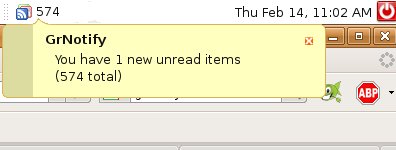
GrNotify is a simple Python written tray application that will allow you to know when there are new items in the Google Reader.
Here’s a screenshot:
Installation using Debian package:
Download the Debian package.
Open it either with dpkg using the gui or using the command line by entering the command:
sudo dpkg --install PACKAGE_NAME.deb
where PACKAGE_NAME is the name of the file.
Installation from source:
Go to the download page and download the latest .tar.gz source install package. Extract the package using the gui or by using the command line:
tar -xzvf PACKAGE_NAME.tar.gz
where PACKAGE_NAME is the name of the file.
Change the current directory to the extracted directory and install GrNotify by executing the following command:
sudo python ./install.py
The program will then install itself into the right directories.
Running the app:
You can then execute the program by entering
grnotify
in a terminal or program executer. I put the command on my startup session, so it will automatically started when I’m starting my Gnome.
Enjoy!!
nice finding, just download for my mac..
been using newsfire, not perfect but fit my need nicely.
unfortunately it’s only available for Mac OS X